


Manage, submit and track Payday Super in one place.
Wrkr is now live.
Manage multiple clients from one login.
Track every contribution with full visibility.
Built-in checks before you submit.
Be ready for the 1 July Payday Super deadline.
Free until July 31st. From $5.50/month after.
REGISTER NOWPRICING
The visibility bookkeepers actually need
Wrkr’s Payday Super payments process is designed to give you complete oversight and peace of mind, tailored specifically to your needs.
Our platform provides:
- Payday Super validation, every pay run
Employee data, contribution amounts, and Payday Super checks are validated each pay run, with issues flagged early. - 7-day payment tracking across clients
See where each super payment sits, from payment through to fund confirmation, for every client. - Real-time visibility & audit trail
Track payments and errors in real time, with an audit trail you can rely on if evidence is needed.
What Wrkr can do for your business
Payday Super turns super into an ongoing process across your client base.
For bookkeepers, that increases the need for visibility, consistency, and the ability to prove what’s been done, and when.
Centralised super management
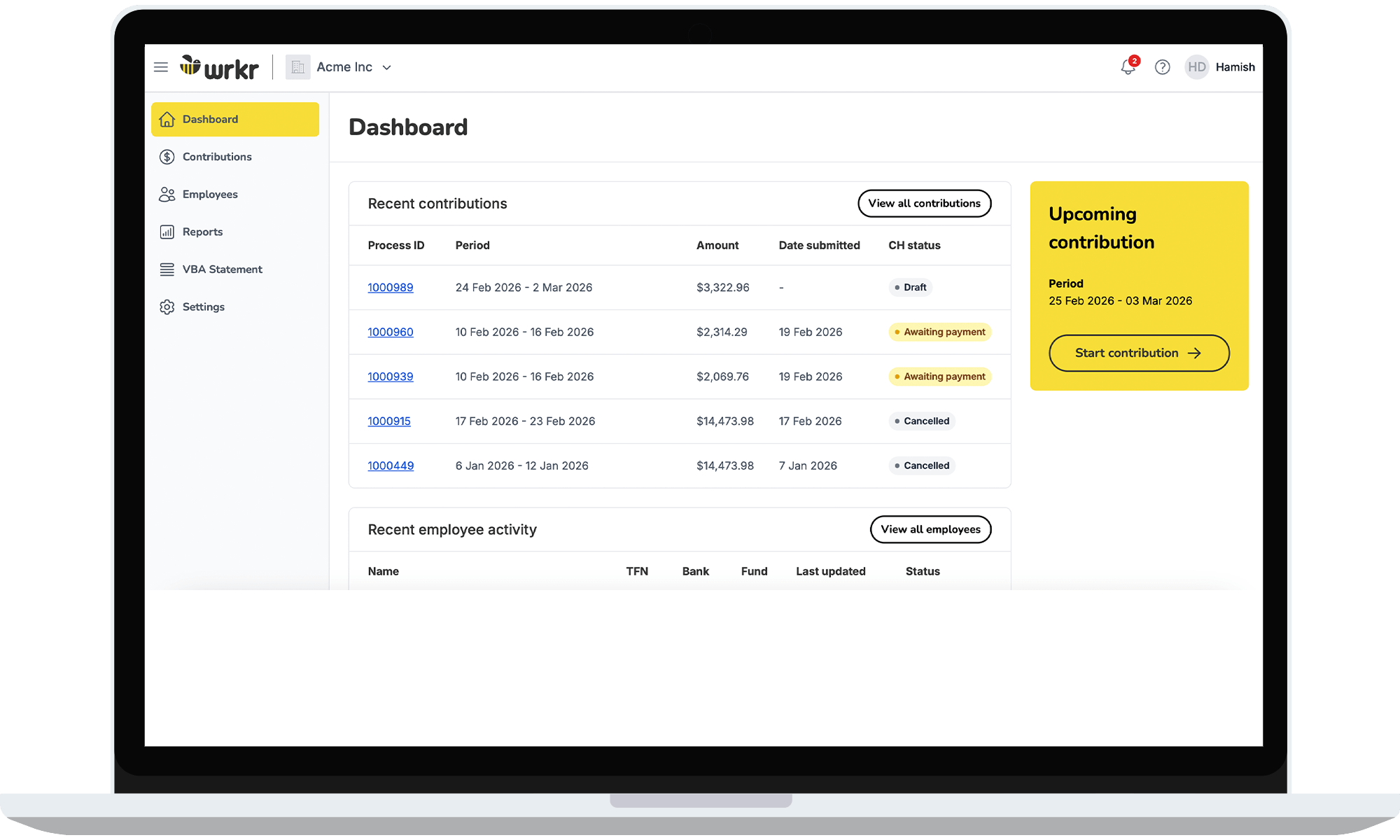
Manage every client’s super contributions from one place.
As super payments move closer to payday, bookkeepers need a clear way to manage multiple contributions across multiple clients. You can create, submit and track contributions across all client entities from one secure login. No spreadsheets. No jumping between systems. Just clear oversight of every submission.
Full contribution timeline
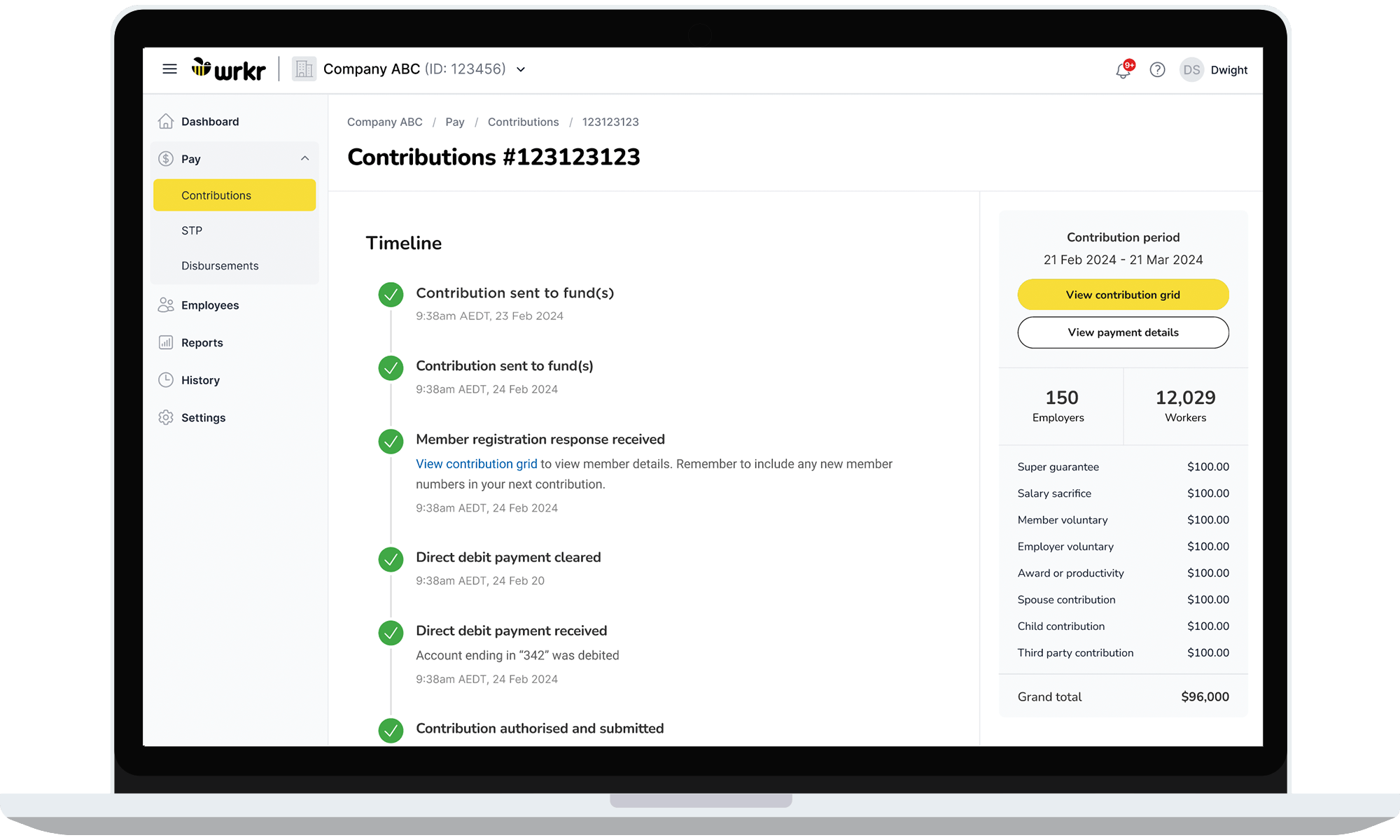
Full visibility across every super contribution.
Every contribution in Wrkr is tracked through a structured timeline, from submission through to payment confirmation and fund processing. This creates a complete, timestamped audit trail so you can quickly see what’s been processed, what’s pending, and what requires attention.
Built-in error checking
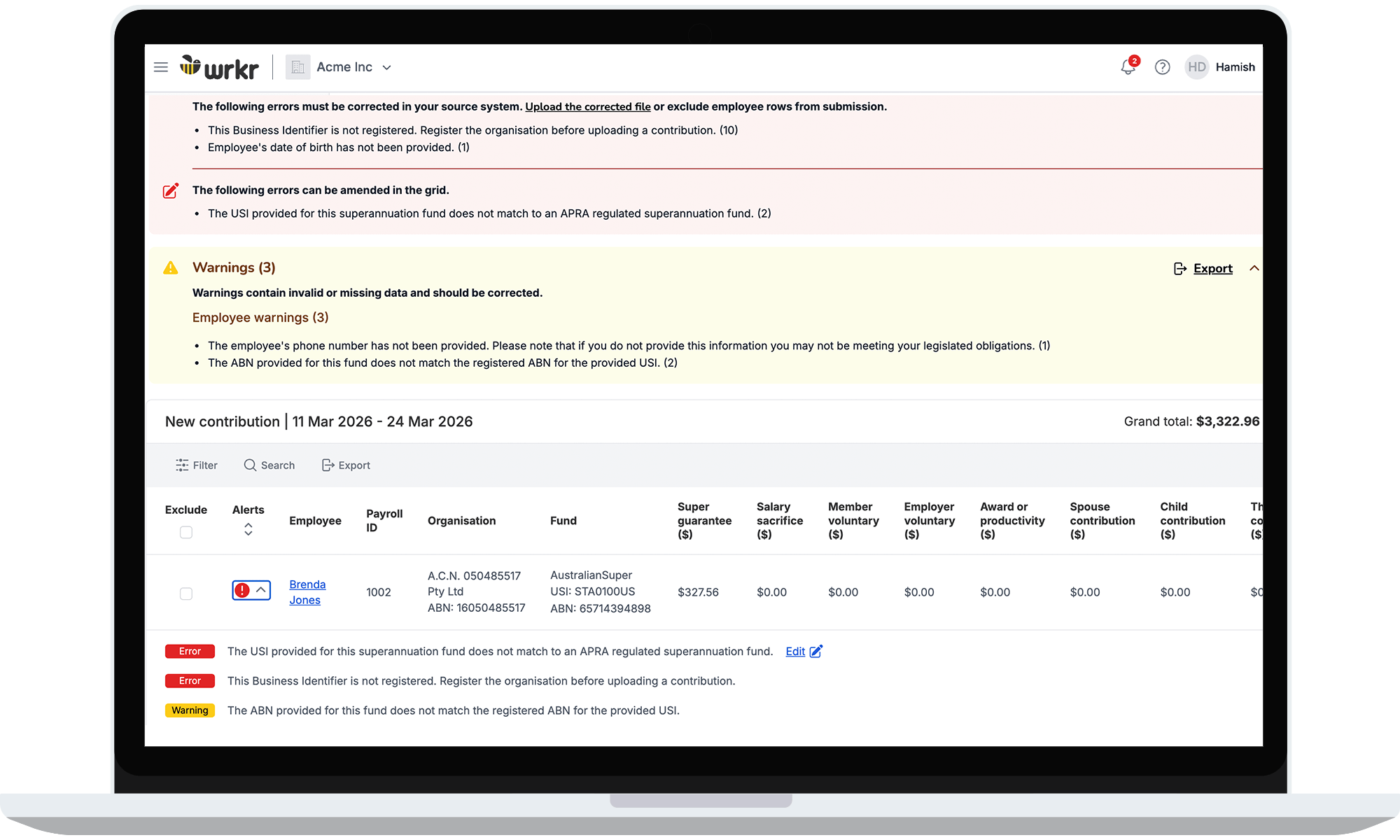
Identify issues before submissions are processed.
You can check contribution data before it is submitted, flagging missing information, invalid fund details and other issues that may cause delays. Errors and warnings are clearly surfaced so they can be corrected quickly, helping bookkeepers avoid rejected submissions and time-consuming rework.
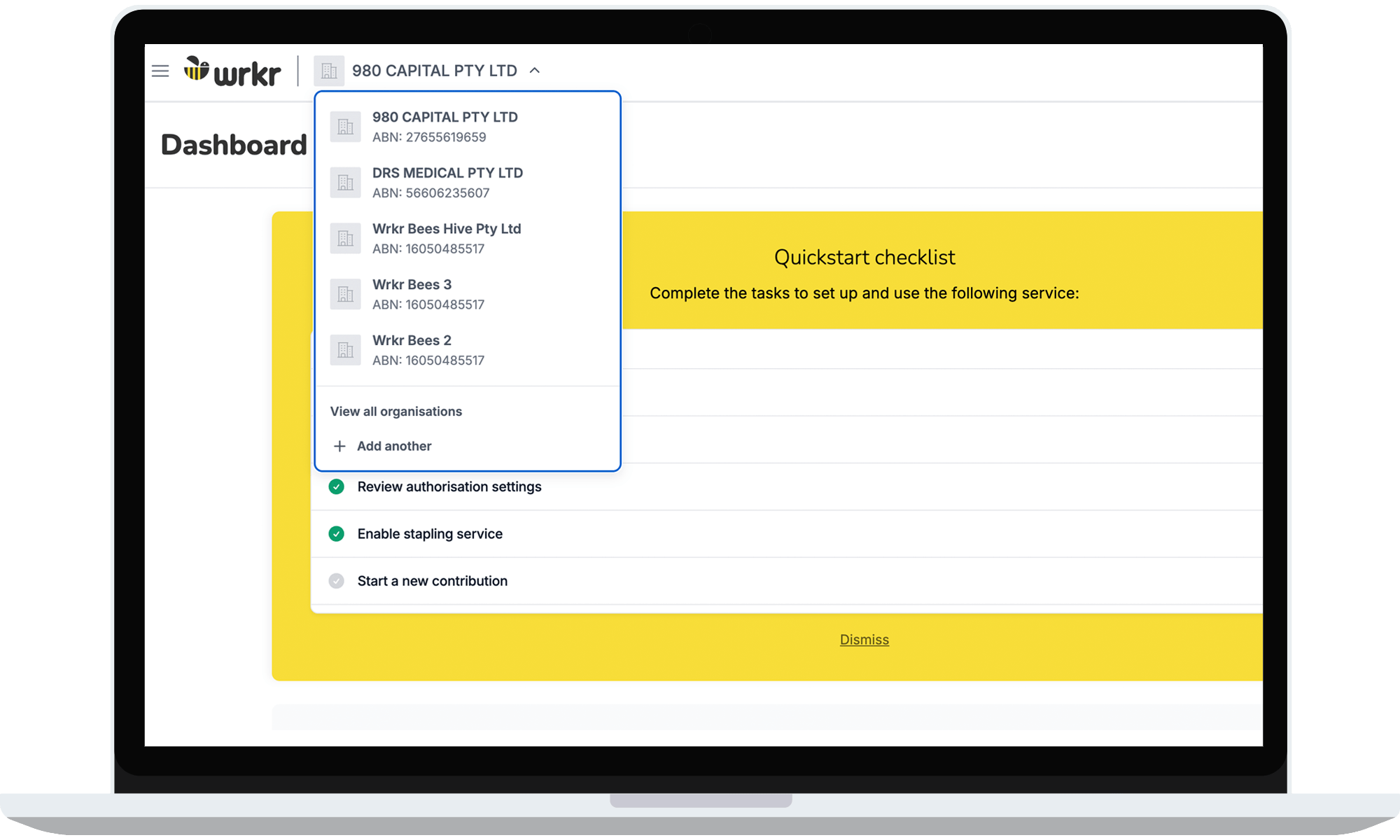
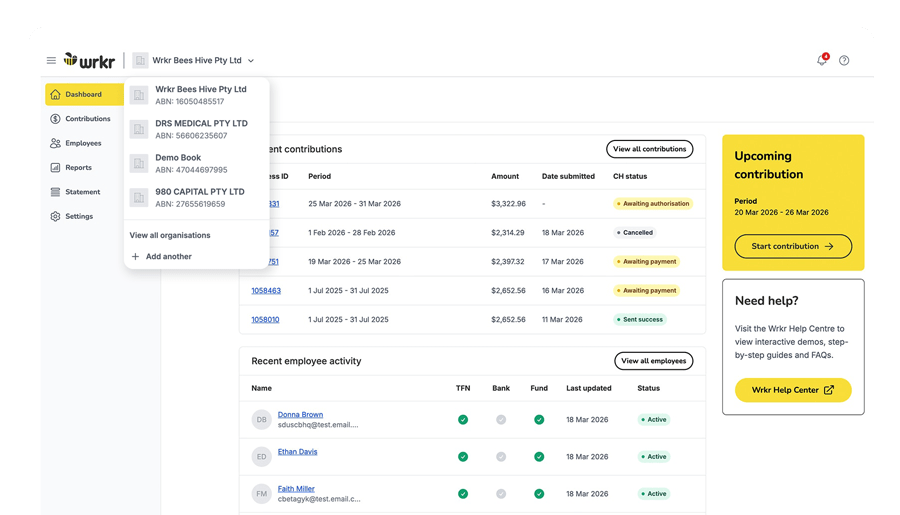
Multi-business access
Manage all your client entities in one secure login.
Switch between client businesses instantly, submit contributions, track payment status and maintain visibility across all organisations. No logging in and out of different systems. Just one place to manage super across your entire client base.
Pricing
Number of employees
Price (per client (ABN) per month)
0–2
$5.50
3–9
$7.70
10-19
$13.20
20–49
$25.60
50–99
$46.20
100–200
$86.90
200+
$86.90
plus $0.65 per employee over 200
plus $0.65 per employee over 200
* Your monthly cost is indicative only. Pricing is based on your organisation’s total employees. If this changes, we’ll automatically move you to the right pricing tier and adjust your next invoice accordingly. You are responsible for all fees and charges levied by your financial institution, which may include fees incurred by us because of insufficient funds, stop payments, and/or trace requests. All fees and charges include GST.
For more information about fees, please refer to the Wrkr platform T&Cs and the Wrkr combined FSG and PDS.
Frequently asked questions
How does Wrkr support bookkeepers who oversee payroll?
Wrkr is built to provide oversight and clarity across payroll and super.
It gives you clear visibility into super payments, real-time status tracking, and a complete, audit trail, helping you support clients with confidence and promote compliant outcomes through clear, transparent records.
Can I manage multiple clients from one Wrkr account?
Yes. Bookkeepers can manage multiple clients from a single Wrkr login. Each client is kept clearly separated, making it easy to stay across activity without juggling logins or spreadsheets.
Are client accounts kept separate and secure?
Yes. Each client operates in their own secure environment within Wrkr.
Client data is fully separated, so businesses can’t see each other and access is controlled based on user roles.
Can a bookkeeper set up Wrkr on behalf of a client?
Bookkeepers have two options:
- Employer-led setup
The employer sets up their Wrkr account and then invites the bookkeeper to access it. - Bookkeeper-led setup (with authorisation)
If authorised, the bookkeeper can set up the account on the employer’s behalf and invite the employer in once it’s live.
In both cases, the account remains owned by the business, while bookkeepers get the access and visibility needed to manage Payday Super confidently.
Is our client data actually secure?
Wrkr protects customer data using the same security frameworks required by the ATO and global financial institutions.
Our controls are independently assessed and continuously maintained, including:
- ISO/IEC 27001 — the international standard for information security management, verified through regular independent audits.
- SOC 2 Type II — confirming our security controls operate effectively over time, not just at a single point.
- ATO Operational Security Framework (OSF) compliant — a mandatory requirement for systems that connect directly to ATO services.
Security threats evolve constantly. That’s why Wrkr focuses on proven frameworks, ongoing assurance, and continuous monitoring.
How does Wrkr work with existing payroll systems?
Wrkr works alongside existing payroll systems.
Clients and bookkeepers continue running payroll as they do today, while Wrkr provides visibility into super payments and timing, giving you clearer oversight without changing payroll processes.
Which super funds does Wrkr Pay support?
Wrkr supports all Australian APRA-regulated super funds, including AustralianSuper, REST, Hostplus, HESTA and Australian Retirement Trust, as well as over 600,000 self-managed super funds.
How long does it take to process payments?
Most super payments are settled within 1–3 business days from submission. Some funds process payments instantly. Wrkr’s dashboard shows clear, fund-level timelines so you always know where each payment stands.
What happens if a super payment fails or needs correcting?
Wrkr provides visibility into payment status and clearly flags issues if a payment doesn’t go through as expected. This allows users to identify and resolve issues quickly, with a clear record of what occurred.
What does Wrkr cost, and who pays for it?
Wrkr is priced per business, starting from $5.50 per month inclusive of GST.
The client pays for the service, while bookkeepers can access and support their clients through the platform without additional cost.